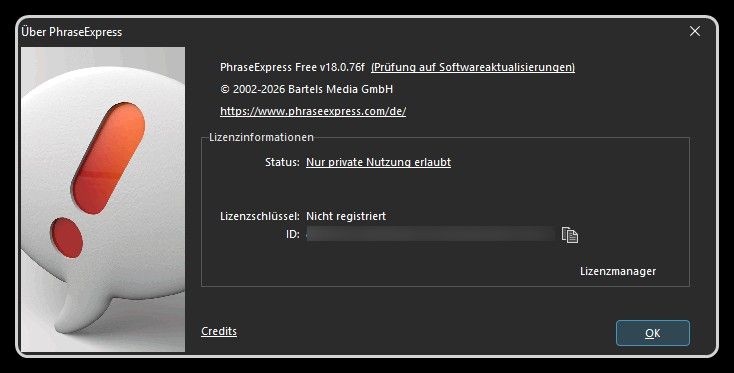
@GregAlexandre OK, then I mark this issue as solved.
Posts
-
RE: [Solved] MS Office 365 16.0.17628.20164 is "Unknown"
-
RE: PLITCH - App-Request
Meantime Versions 2.18.4 and 2.18.5 were released.
Here the version info of 2.18.5:File name and path: C:\Users\olive\AppData\Local\Programs\PLITCH\PLITCH.exe Product Name: PLITCH Internal Name: PLITCH.dll Original Filename: PLITCH.dll File Description: PLITCH Company: PLITCH Legal Copyright: Legal Trademarks: Comments: File Version String: 2.18.5.0 File Version: 2.18.5.0 Product Version String: 2.18.5+d5d023cac37e6398062fb9016f8cfbebd4401c07 Product Version: 2.18.5.0 -
PLITCH - App-Request
Name of the app:
PLITCHDeveloper
MegaDev GmbHWebsite
https://www.plitch.com/Download Site:
https://www.plitch.com/de/downloadsoftwareVersion number displayed in the app:
2.18.3App-Icon:

Here the information extracted from the EXE file:
File name and path: C:\Users\olive\AppData\Local\Programs\PLITCH\PLITCH.exe Product Name: PLITCH Internal Name: PLITCH.dll Original Filename: PLITCH.dll File Description: PLITCH Company: PLITCH Legal Copyright: Legal Trademarks: Comments: File Version String: 2.18.3.0 File Version: 2.18.3.0 Product Version String: 2.18.3+acbbb8fe0a46696bfe82b10a6ca386c446fc51bc Product Version: 2.18.3.0 -
RE: NVIDIA app - OLD Version Recommended
For the NVIDIA app there is still an older version recommended:
- The detected/installed version is: 11.0.5.420
- The recommended version is: 10.0.3 (11.0.3.241)
@Tom: When will this be fixed?
-
RE: [Solved] CPU-Z - Recommended Version (2.16.8) Not Available
For CPU-Z now the version 2.17 is detected and this version is also recommended.
@Tom: Thank you for fixing this! -
RE: Microsoft 365 Apps (Current Channel) - New Icons
Currently, there are still the old icons shown.
In the Windows 11 start menu I have the new icons (here just two examples):


@Tom: When will this be fixed?
-
RE: [Solved] FreeCommander XE 2026 Build 940 - Detected Version Incorrect
For FreeCommander XE 2026 Build 940 now the version XE 2026 release 940 donor is detected.
@Tom: Thank you for fixing this! -
RE: [Solved] MailWasher Pro 8.0.96 - No Longer Beta
For MailWasher Pro the correct app-icon is now shown.
Therefore, this issue is solved. -
RE: Synergy - App-Request
Meantime, Synergy version 3.5.0 was released:

Here the information extracted from the EXE file:
File name and path: C:\Program Files\Synergy\Synergy.exe Product Name: Synergy Internal Name: Synergy Original Filename: File Description: Use the keyboard, mouse, or trackpad of one computer to control nearby computers. Company: Symless Legal Copyright: Copyright © 2025 Symless Legal Trademarks: Comments: File Version String: 3.5.0 File Version: 3.5.0.0 Product Version String: 3.5.0.0 Product Version: 3.5.0.0 -
RE: [Solved] MailWasher Pro 8.0.96 - No Longer Beta
For MailWasher Pro now the version 8.0.96 is detected.
But the OLD icon is still shown! -
[Solved] FreeCommander XE 2026 Build 940 - Detected Version Incorrect
Donor Version of FreeCommander
For FreeCommander XE (Donor) 2026 Build 940 VulnDetect detects the version 2025.0.0.920.
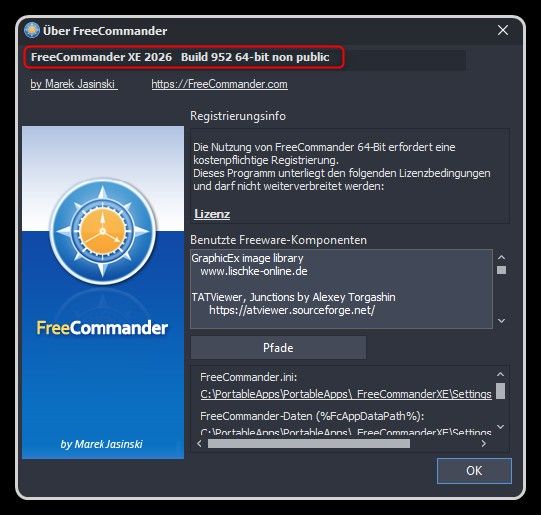
In the Help -> About window of FreeCommander XE the version number 2026 Build 940 is displayed:
Here the information extracted from the EXE file:
File name and path: C:\PortableApps\PortableApps\_FreeCommanderXE\FreeCommander.exe Product Name: FreeCommander XE Internal Name: Original Filename: File Description: FreeCommander (x64) - file manager for Windows Company: Marek Jasinski Legal Copyright: www.freecommander.com Legal Trademarks: Comments: File Version String: 2026.0.0.940 File Version: 2026.0.0.940 Product Version String: 2025.0.0.920 Product Version: 2025.0.0.920
Public Version of FreeCommander
Today also FreeCommander XE 2026 Build 940 32-bit public was released:
https://freecommander.com/en/downloads/This is the PUBLIC version, that is available for ALL USERS.
@Tom Please check, if also for the public version an old version is detected.
No more 32-Bit Donor Versions
From now on, all Donor versions are only available as 64-Bit versions.
Here a note in the donors-downloa page:

This means, that from now on:
- all 64-Bit versions are always Donor versions
- all 32-Bit versions are always Public versions
-
RE: [Solved] MailWasher Pro 8.x - New Icon
I created a new topic MailWasher Pro 8.0.96 - No Longer Beta to have one clear and short topic.
Therefore, I am closing this topic here. -
RE: [Solved] MailWasher Pro 8.0.78 - Installed version is Beta
I created a new topic MailWasher Pro 8.0.96 - No Longer Beta to have one clear and short topic.
Therefore, I am closing this topic here. -
[Solved] MailWasher Pro 8.0.96 - No Longer Beta
New Version of MailWasher Pro
MailWasher Pro Version 8.0.96 was officially released:
https://firetrust.com/products/mailwasher-pro/downloadThis is NO LONGER A BETA VERSION,
Therefore, MailWasher Po 8.0.96 is the current version, that should be recommended.Here the information extracted from the EXE file:
File name and path: C:\Program Files (x86)\Firetrust\MailWasher\MailWasherPro.exe Product Name: MailWasher Pro Internal Name: MailWasherPro.exe Original Filename: MailWasherPro.exe File Description: MailWasher Pro Company: Firetrust Legal Copyright: Legal Trademarks: Comments: File Version String: 2025.8.0.96 File Version: 2025.8.0.96 Product Version String: 2025.8.0.96 Product Version: 2025.8.0.96
New Icon of MailWasher Pro
MailWasher Pro also has a NEW ICON that was introduced in 8.x:

-
RE: [Solved] MailWasher Pro 8.0.78 - Installed version is Beta
@tom
MailWasher Pro Version 8.0.96 was officially released:
https://firetrust.com/products/mailwasher-pro/downloadThis is NO LONGER A BETA VERSION,
Therefore, MailWasher 8.0.96 is the current version and the new icon must be shown!Here the information extracted from the EXE file:
File name and path: C:\Program Files (x86)\Firetrust\MailWasher\MailWasherPro.exe Product Name: MailWasher Pro Internal Name: MailWasherPro.exe Original Filename: MailWasherPro.exe File Description: MailWasher Pro Company: Firetrust Legal Copyright: Legal Trademarks: Comments: File Version String: 2025.8.0.96 File Version: 2025.8.0.96 Product Version String: 2025.8.0.96 Product Version: 2025.8.0.96 -
RE: [Solved] MailWasher Pro 8.x - New Icon
@tom
MailWasher Pro Version 8.0.96 was officially released:
https://firetrust.com/products/mailwasher-pro/downloadThis is NO LONGER A BETA VERSION,
Therefore, MailWasher 8.0.96 is the current version and the new icon must be shown!Here the information extracted from the EXE file:
File name and path: C:\Program Files (x86)\Firetrust\MailWasher\MailWasherPro.exe Product Name: MailWasher Pro Internal Name: MailWasherPro.exe Original Filename: MailWasherPro.exe File Description: MailWasher Pro Company: Firetrust Legal Copyright: Legal Trademarks: Comments: File Version String: 2025.8.0.96 File Version: 2025.8.0.96 Product Version String: 2025.8.0.96 Product Version: 2025.8.0.96 -
Microsoft 365 Apps (Current Channel) - New Icons
Microsoft has added new icons to their Microsoft 365 apps.
Details see here: https://microsoft.design/articles/fluid-forms-vibrant-colors/Here are the new app-icons (extracted from the EXE files):
Microsoft Access

Microsoft Excel

Microsoft OneNote

Microsoft Outlook

Microsoft PowerPoint

Microsoft Publishe

Microsoft Word

-
RE: [Solved] PhraseExpress - Recommended Version (17.0.131) Not Available
This is weird:
- On the English download page version 17.0.129 is offered
- On the German download page version 17.0.131 is offered
Therefore, it is correct, that VulnDetect offers 17.0.131.
I mark the issue as solved. -
RE: Microsoft 365 Apps - OLD Version Recommended
Here a screen shot of my PC:

This problem occurs on ALL my machines!